
Loyalty levels: cashback settings
How to set up a loyalty level in the Eatery Club admin panel: the level card fields, matching the ERP, translations and what the level card shows.
Updated: 13.10.2026Loyalty levels set the cashback percentage depending on how much a guest has spent. The level logic runs in the ERP system (the POS): the boundaries and the percentage are set there, and that is where a guest moves to a new level. The admin panel shows the levels to guests and lists the guests on each level. The «Рівні» (Levels) section sits in the «5.Рівні» (Levels) group.
The panel must match the ERP
The values in the panel repeat the ERP settings: boundaries, cashback percentage and the guest category in the ERP. If they differ, the guest sees different terms in the app from those the POS calculates with. So first confirm the parameters in the ERP, then create the level.
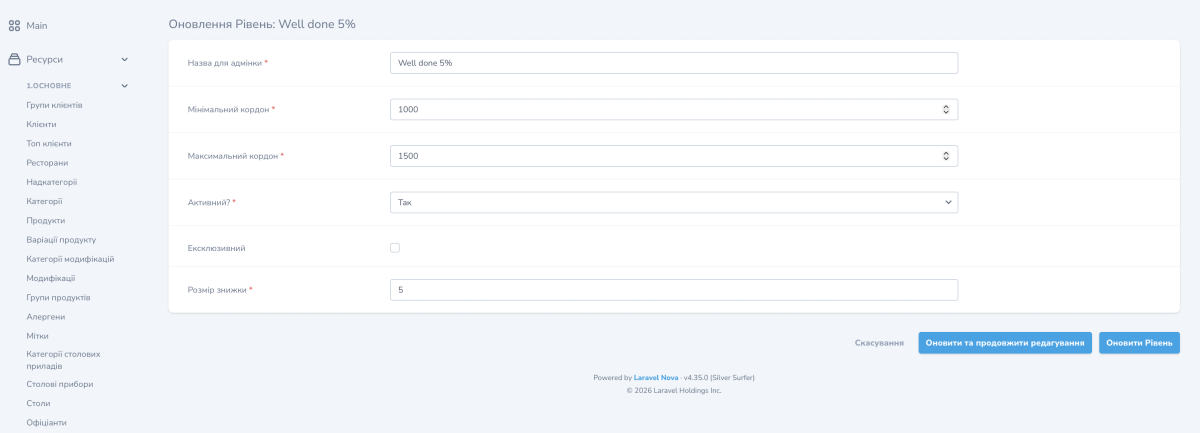
Fields of the level card
- «Назва для адмінки» (Name for the admin panel): the internal name, required;
- «Мінімальний кордон» (Minimum boundary): the spend amount at which the level starts;
- «Максимальний кордон» (Maximum boundary): the spend amount at which the level ends;
- «Активний?» (Active?): whether the level is shown to guests;
- «Ексклюзивний» (Exclusive): an additional level checkbox;
- the user category ID in the ERP: the guest category that the level corresponds to in the POS;
- «Розмір знижки» (Discount size): the cashback percentage.
- The form requires everything except «Ексклюзивний»: without the name, both boundaries, the active state, the ERP category and the discount size the level will not save. The ERP category is picked from a list, not typed in.
The list of levels also shows the number of clients on each level.
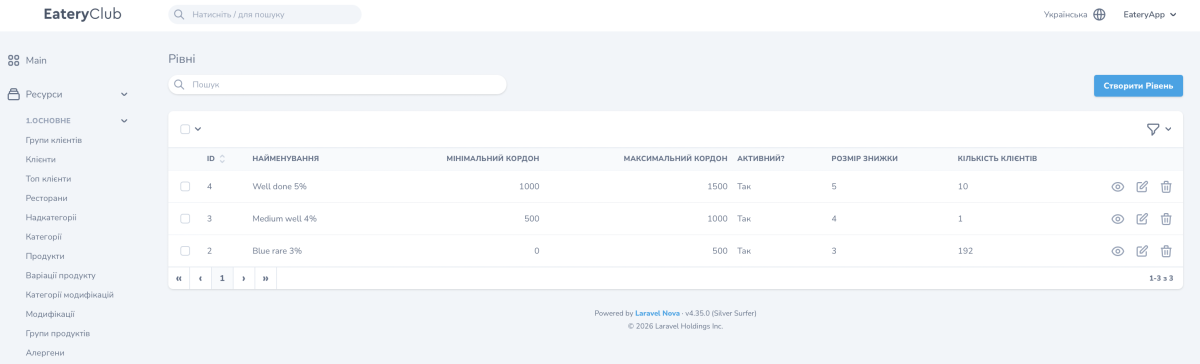
How to create a level
- Confirm in the ERP the minimum and maximum boundary, the cashback percentage and the guest category.
- In the «Рівні» section press the create button and fill in the fields from the ERP data.
- Turn on «Активний?» and save.
- Open the created level and fill in «Переклади» (Translations): the name and subtitle for every language of the project.
What the level card shows
- translations of the name and subtitle by language;
- the list of guests on this level with the same columns and filters as in the «Клієнти» (Clients) section;
- an action to download the weekly report on the level’s clients.
