
Clients: guest database, filters and bulk actions
Manage guests in Eatery Club: analytics, filters, guest profiles, bulk push messages, client groups and promo code assignment.
Updated: 13.10.2026The «Клієнти» (Clients) section in the «1.Основне» (Main) group holds the project’s guest database: profiles, loyalty point balances, transactions and orders. Here you find a guest, edit a profile and run bulk actions: push messages, adding to a group, assigning a promo code.
Analytics above the table
The top of the page consists of widgets: new users and transactions over 30, 60 or 90 days, collected and spent points, the same figures by month over six months to three years, guests by age group, money spent by month, and the number of active users. Each widget’s period is switched separately.
The guest table
Table columns: «ID», «Бонуси» (Bonuses, the current point balance), «Бонуси за весь час» (Lifetime bonuses), «Ім’я» (First name), «Прізвище» (Last name), «Дата народження» (Date of birth), «Активний?» (Active?), «Телефон» (Phone), «Кількість транзакцій» (Number of transactions), «Місто» (City) and «Останнє відвідування» (Last visit). Use the column headers to sort the table. On the right of each row are the actions: view the card, edit and delete.
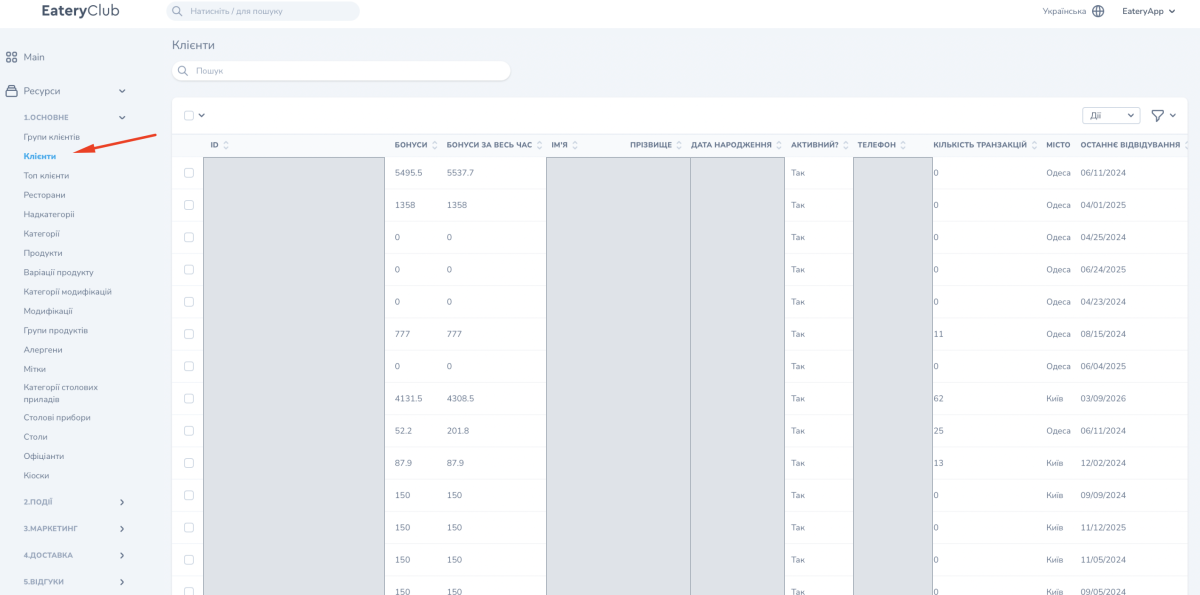
The search box above the table finds a guest by profile data, for example by phone, name or ID. Filters open with the icon on the right above the table: gender, city, age, point balance and spent points, creation date, last visit, date of the last order, number of orders and client group. Rows per page: 25, 50 or 100.
The guest card
Viewing opens a card with several blocks: a chart of accrued points over 30, 60 or 90 days; profile data (ID, balances, card number, name, date of birth, gender, activity, email, phone, number of transactions, city, last visit); «Транзакції» (Transactions) from POS orders with time, accrued points, order amount and payment with points; «Замовлення» (Orders) placed through the site or the app; «Групи клієнтів» (Client groups) the guest belongs to, with the option to attach a group right from the card.
Do not change the guest’s phone in the panel: it is the sign-in key in the app. The point balance is not edited manually either: it is synchronized from the ERP.
Bulk actions
- Filter the audience you need and tick the guests. The checkbox in the table header selects the whole page.
- Open the «Дії» (Actions) list above the table.
- Choose the action: «Масова розсилка push-сповіщень» (Bulk push notification), adding or editing client groups, or «Вибрати промокод» (Select a promo code).
- Fill in the action form and confirm.
For a push message, fill in the subject and text for every language of the project; add an image if needed. A promo code to assign must already exist in the «Промокоди» (Promo codes) section.
