
Top clients: the most active guests by points and transactions
The «Топ клієнти» section of the Eatery Club admin panel: table columns, filters by points and visits, and what the guest ranking is used for.
Updated: 13.10.2026The «Топ клієнти» (Top clients) section in the «1.Основне» (Main) group lists the guests with the largest loyalty point balances. It is an analytical list: nothing is edited here and there are no bulk actions. To message a guest or assign a promo code, go to the «Клієнти» (Clients) section.
Table columns
The table has eight columns: «ID», «Бонуси» (Bonuses, the current point balance), «Бонуси за весь час» (Lifetime bonuses), «Ім’я» (First name), «Прізвище» (Last name), «Середня сума замовлення» (Average order amount), «Витрачені бонуси» (Spent bonuses) and «Кількість транзакцій» (Number of transactions). Every column sorts with the arrows in its header. Clicking the «ID» value opens the guest card.
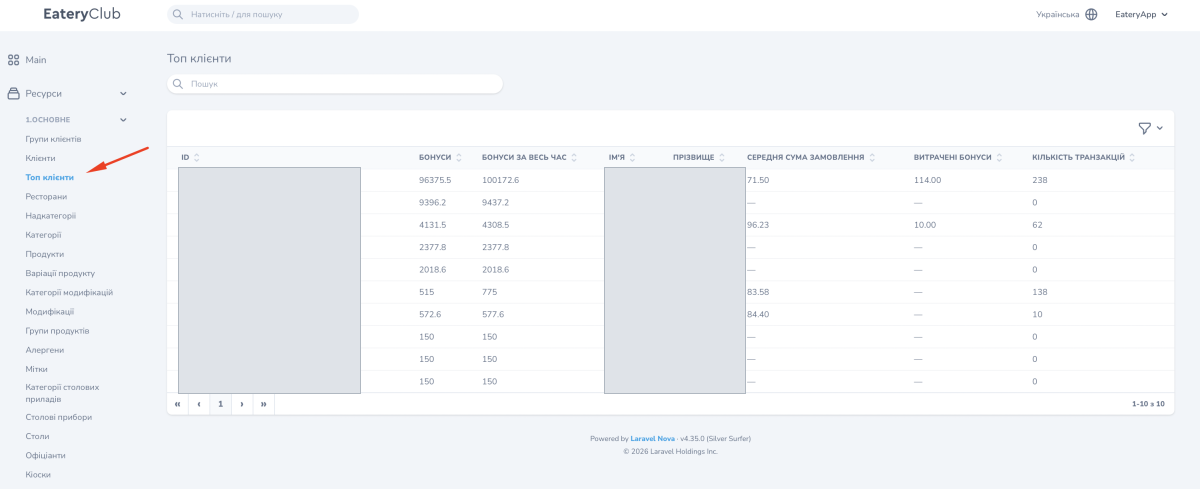
Filters
The filter icon above the table opens the conditions: point balance, spent points, average order amount over 30, 60 or 90 days, payment amount, frequency and interval of point accrual, and the date of the last visit. Numeric filters take a from–to range. The same panel sets the rows per page: 15 or 25.
What it is for
- find the guests who come back most often and collect the most points;
- check whether the loyalty program works: how many points guests spend, not only collect;
- build a list of guests for a personal offer.
Bulk actions with the selected guests are run in the «Клієнти» section: push messages, groups and promo code assignment live there. How the cashback percentage works is described in the article on loyalty levels.
