Info blocks in the app: onboarding and hints
The seven info block types and the screens they appear on, plus the order of steps for writing the referral program description in the translations.
Updated: 07.10.2026The «Інформація» (information) section holds the text screens of the app: onboarding on first launch, a description of the loyalty program, delivery terms and other explanations for the guest. Every block has a type, and the type is what decides which app screen the block appears on.
Block types and where they appear
The block types below correspond to these app screens:
- «Накопичення подарунків» (accumulating gifts): the «Скарбничка» (money box) page;
- «Накопичення балів» (accumulating points): the guest card page with the QR code;
- «Онбординг» (onboarding): first launch of the app;
- «Реферальна програма» (referral program): the referral program page.
If the form does not let you select the onboarding screen you need, contact Eatery Club support.
Onboarding appears on the first launch of the app. The guest sees the notification and geolocation screens at the point where the app asks for system permissions.
The «Назва для адмінки», «Активний?» and «Тип» fields are required by the form.
How to write the description of the referral program
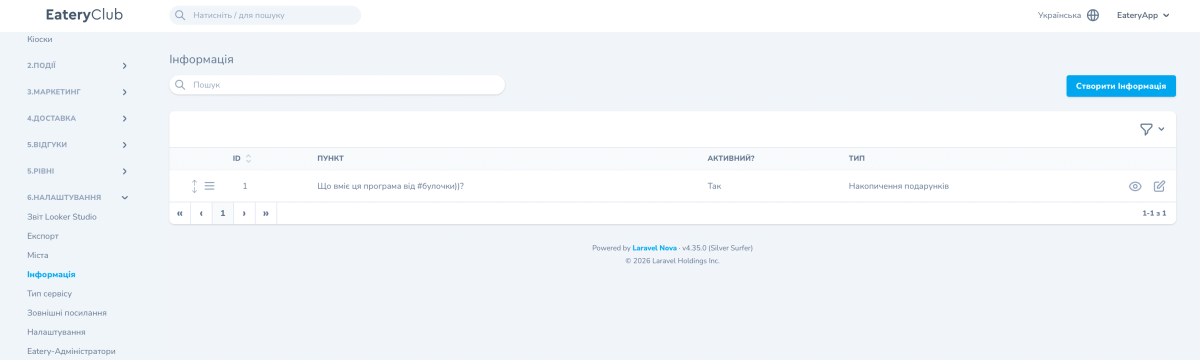
- Open the «Інформація» section and click «Створити Інформація» (create information).
- Enter a name for the admin panel, for example «Реферальна: опис». The guest does not see it; in the list it appears in the «Пункт» (item) column.
- In the «Тип» field, choose «Реферальна програма».
- Set «Активний?» (active?) to «Так» (yes).
- Save the record.
- Open the block with the view button and fill in «Переклади» (translations). The «Назва» (name) and «Опис» (description) fields inside the translations hold all the text the guest sees.
Where to find it in the admin panel
The section is called «Інформація». You open it from the «6.Налаштування» (settings) group of the side menu. In the list each block shows the columns «Пункт», «Активний?» and «Тип».