
Service Type: Linking Fulfillment and Payment
How to set up service types in Eatery Club: linking the fulfillment method to the available payment types, the card fields, and two scenarios.
Updated: 04.09.2026A service type links how an order is fulfilled (delivery, pickup, table ordering, kiosk) with the payment types available for that method. The matrix is defined at account level and is then linked to restaurants, menu categories and promo codes.
Example of a configured matrix
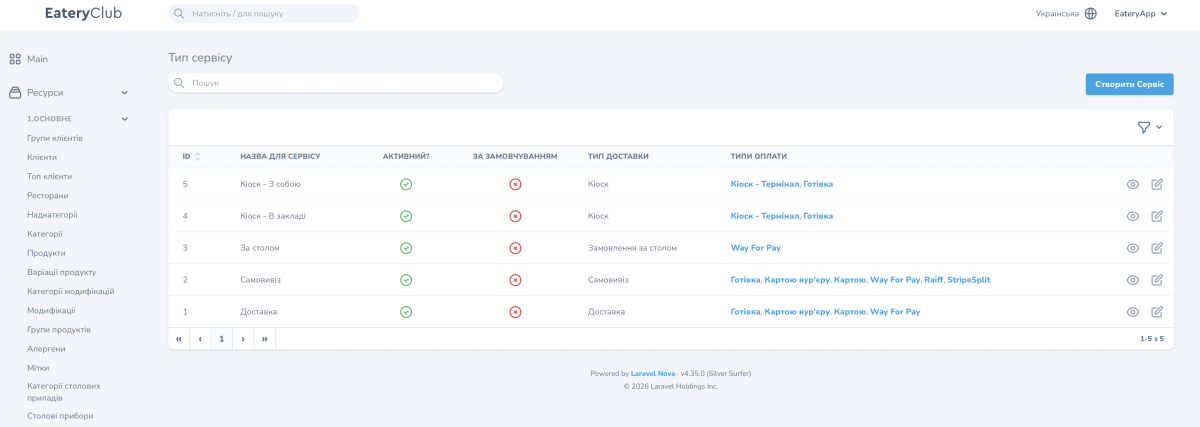
In the example below, the account has five service types. The panel labels stay in Ukrainian; the “Типи оплати” column holds the aliases of payment types, not the names of payment systems.
- “Доставка” (delivery), delivery type “Доставка”: Готівка (cash), Картою кур’єру (card to the courier), Картою (card), Way For Pay.
- “Самовивіз” (pickup), delivery type “Самовивіз”: Готівка, Картою кур’єру, Картою, Way For Pay, Raiff, StripeSplit.
- “За столом” (at the table), delivery type “Замовлення за столом”: Way For Pay.
- “Кіоск – В закладі” (kiosk, eat in), delivery type “Кіоск”: Кіоск – Термінал (kiosk terminal), Готівка.
- “Кіоск – З собою” (kiosk, take away), delivery type “Кіоск”: Кіоск – Термінал, Готівка.
You define the set of service types and their names yourself. At checkout the guest sees only the payment methods added to the service type they picked.
Service type fields
- “ID”. Filled in automatically.
- “Назва для сервісу”, the service name. The name of the record in the admin panel.
- “Активний?”, active. Whether this service type is available.
- “За замовчуванням”, by default. Marks the default option.
- “Тип доставки”, the delivery type. One of: “Доставка”, “Самовивіз”, “Замовлення за столом”, “Кіоск”.
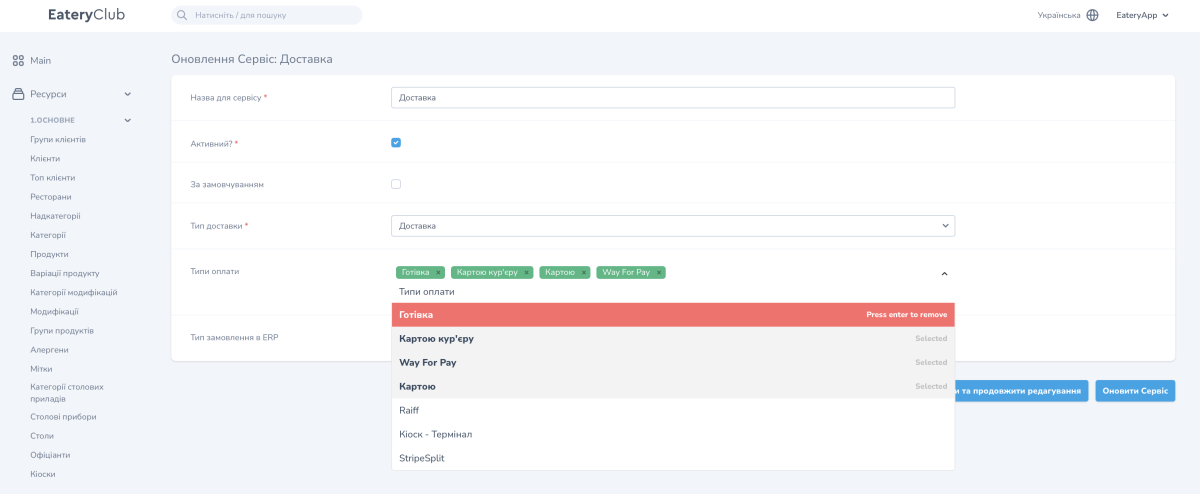
- “Типи оплати”, the payment types. Multi-select from the list of payment types you created.
- “Тип замовлення в ERP”, the order type in the ERP. The order type code on the POS system (cash register) side.
The service types list shows “ID”, “Назва для сервісу”, “Активний?”, “За замовчуванням”, “Тип доставки” and “Типи оплати”. The record card opens from there, and the “Типи оплати” field is filled in with a multi-select.
Where the service type is used
- Restaurants. The “Доступні типи сервісу” field on the restaurant card.
- Menu categories. The “Доступні типи сервісу” field.
- Promo codes. The “Тип сервісу” field.
This lets you leave only delivery in one restaurant, build a menu category just for the kiosk, or limit a promo code to a single fulfillment method.
How to add a service type for catering
- Open the “6.НАЛАШТУВАННЯ” section, the “Тип сервісу” subsection, and click “Створити Сервіс”.
- In the “Назва для сервісу” field, enter “Кейтеринг”.
- Tick “Активний?”.
- In the “Тип доставки” field, select “Доставка”.
- In the “Типи оплати” field, select the payment methods you accept for catering.
- Save the record.
- Open the card of the restaurant that handles catering and add the new service type to the “Доступні типи сервісу” field.
How to add a payment method to pickup
Preconditions: the payment type already exists, has “Активний?” and “Видимий для клієнтів” switched on, and is linked to the restaurants where pickup operates.
- Open the “6.НАЛАШТУВАННЯ” section, the “Тип сервісу” subsection.
- Open the “Самовивіз” record for editing.
- In the “Типи оплати” field, add the payment method you need, for example StripeSplit.
- Click “Оновити Сервіс”.
After that the payment method is available to the guest on pickup. If it should not be offered in other fulfillment scenarios, check the “Типи оплати” field in each of the remaining service types separately.
