
Collection promotions: a gift for repeat purchases
Set up a collection promotion in Eatery Club: ERP preparation, promotion fields, translations and gift collection using a QR code.
Updated: 13.10.2026A collection promotion gives the guest a gift for a set number of purchases. The rules are defined in the ERP system (the POS): which products take part, how many of them the guest has to buy and what they receive. The «Акції» (Promotions) section of the «3.Маркетинг» (Marketing) group is where the promotion is shown to guests and switched on.
What to do before configuring it in the panel
- Create the promotion in the ERP system.
- In the panel open the «Продукти» (Products) section and run the menu synchronization. The order is described in How to work with products.
- After the synchronization the promotion ID appears in the list of the «Основний ID акції» (Main promotion ID) field.
The promotion list
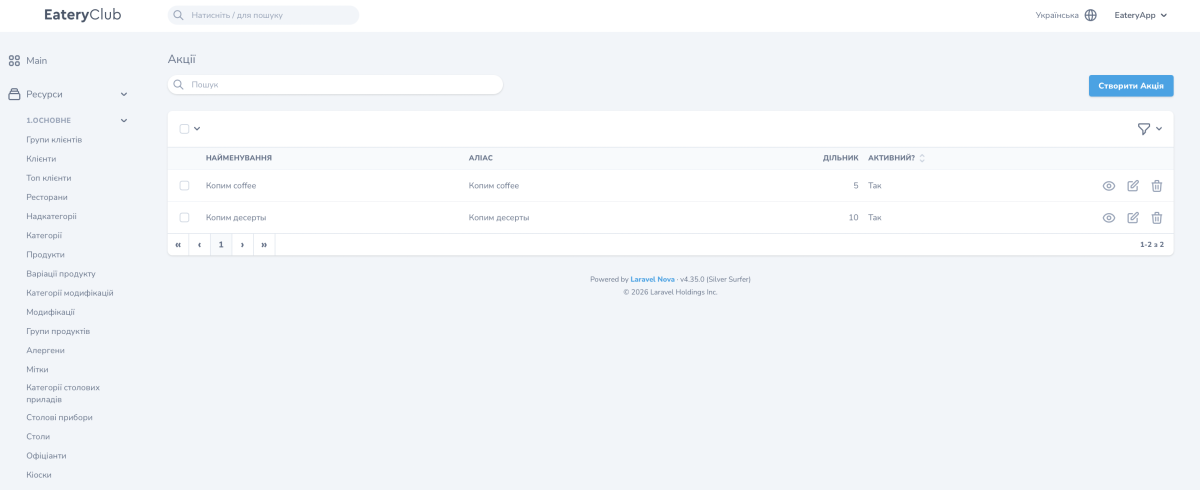
The list has four columns: «Найменування» (Name), «Аліас» (Alias), «Дільник» (Divider) and «Активний?» (Active?). On the right of each row are view, edit and delete, and above the table sits the create button.
Fields of the promotion card
- «Аліас»: the internal name of the promotion, required;
- «Основний ID акції»: the promotion that came from the ERP, required;
- «Лого» (Logo): the image of the gift, required;
- «Дільник»: how many products the guest has to collect; it must match the condition in the ERP;
- «Активний?»: «Так» (Yes) or «Ні» (No).
The view mode additionally shows «Найменування», which came from the ERP, and the «Переклади» (Translations) block with the «Найменування» and «Мова» (Language) columns.
How to create a promotion
- Open «Акції» and press the create button.
- Fill in «Аліас».
- Choose «Основний ID акції» from the list.
- Upload «Лого».
- Set «Дільник» to the same number as in the ERP.
- Set «Активний?» to «Так» and save.
- Open the created promotion and fill in «Переклади» for every language of the project.
How the guest receives the gift
- The guest buys the required number of products from the promotion.
- A QR code appears in the app.
- The guest shows the QR code to the cashier.
- The cashier scans it and the gift is issued through the ERP system.
The description of the promotion for guests is shown by an info block in the app.
