
System push settings: texts, visit reviews, and guests without a city
Find where to change system push texts, configure visit review requests, and send news to guests without a selected city in Eatery Club.
Updated: 09.09.2026Push settings let you replace standard notification texts, enable visit review requests, and choose whether guests without a selected city receive news pushes.
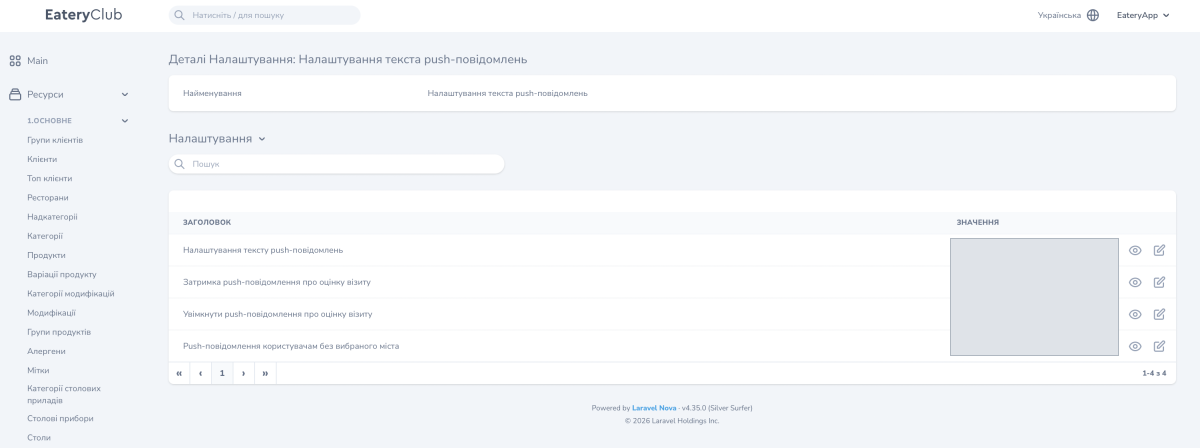
Open Settings («Налаштування») and find the push settings group. In the screenshot, it is labeled «Налаштування текста push-повідомлень». Each parameter is edited and saved separately.
Change standard notification texts
Push notification text settings («Налаштування тексту push-повідомлень») accepts a file with custom texts to replace the standard messages, including order status notifications.
- Contact Eatery Club support to prepare a file in the required format with your project’s texts and languages. Specify which messages need to change.
- Before replacing an existing file, save a copy of it.
- Edit the parameter, select the prepared file, and save the change.
- Check the relevant scenario in the app and the notification texts in the required languages.
This setting changes the text of system messages. Their sending conditions are configured separately.
Configure a visit review request
- Open Enable visit review push («Увімкнути push-повідомлення про оцінку візиту»), enable it, and save.
- Open Visit review push delay («Затримка push-повідомлення про оцінку візиту»). Enter the delay in minutes after the order closes, such as 30, and save.
- Check the scenario after completing a test order. Notifications must be allowed on the device.
The delay sets the waiting period before the request. It does not guarantee that the guest sees the push at that exact minute; receipt also depends on device settings.
News pushes for guests without a city
Push notifications for users without a selected city («Push-повідомлення користувачам без вибраного міста») determines whether they receive news notifications. Check it alongside the cities selected for an event, especially for local promotions.
Birthday and last-transaction messages are configured under automated push notifications.
