
Review questions: custom ratings
How to create a custom review question in Eatery Club, enable it for guests, and where to read the 1 to 5 ratings guests give it.
Updated: 10.09.2026Besides the overall rating, a guest can answer additional questions in the review form. The guest rates each question from 1 to 5. The answers appear in the review details together with the comment and the overall rating.
The review sections are grouped in the sidebar under Reviews («5.Відгуки»). The questions open from the Review Questions section («Запитання до відгуку»). The list has two columns: Message («Повідомлення») with the question text, and Active («Активувати»). Each row has a view button with an eye icon and an edit button with a pencil icon on the right.
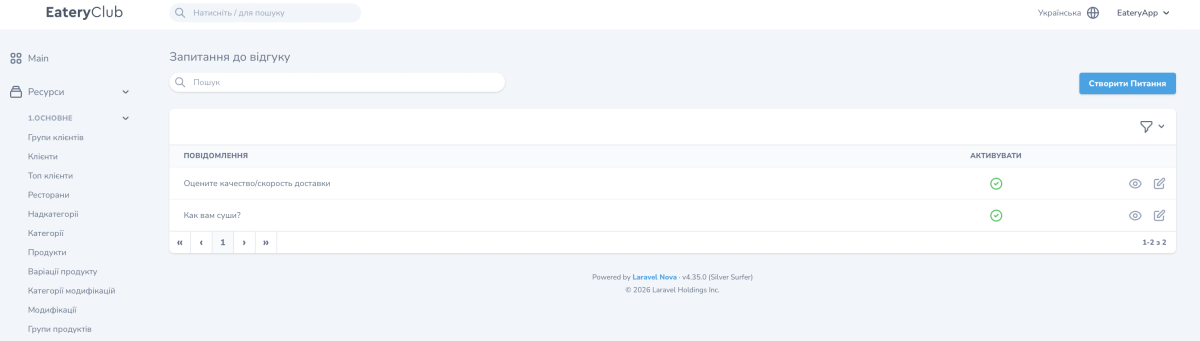
Create a question
- Open Review Questions («Запитання до відгуку») and click Create Question («Створити Питання»).
- In the Message field («Повідомлення»), enter the question text, for example “How would you rate the quality of the food?”. The field accepts emojis.
- Turn on Active («Активувати») so guests see the question.
- Save the question.
- Leave a test review and check that the question appears in the form.
Guests see the text exactly as you entered it. Keep it short and make sure it can be answered with a rating rather than words.
Edit or hide a question
- Open the row you need with the edit button (pencil icon).
- Change the Message text or switch Active on or off.
- Save the change.
Changes apply to new reviews only. Answers guests already submitted are stored as they were.
Where to read the answers
The answers appear in the details of each review. For reading and filtering reviews, see Guest reviews: how to read and analyze ratings.
