Modifications: ingredients, add-ons, sauces
Modifications arrive from the POS system. How to activate them in the Eatery Club panel, fill in the translations of the name, and set the display order.
Updated: 07.10.2026A modification is a single product option: an ingredient, an add-on, or a sauce. For example, wasabi, pickled ginger, soy sauce, or an extra portion of salmon. The interface also calls such options modifiers. A guest selects them on the product card, and they are shown in groups through modification categories.
Create modifications in the point-of-sale (POS) system. They reach the admin panel during synchronization; in the panel you control how they are shown to guests.
What you can do in the panel
- activate or deactivate a modification;
- fill in the translations of the name for every language;
The price and the composition of a modification arrive from the POS system, so change them there.
How to fill in the translations
- Open the modification through «Перегляд».
- In the «Переклади» block, enter the name for every language.
Without a translation, a modification and its category are displayed incorrectly, so fill in the translations for every modification.
Where to find it in the admin panel
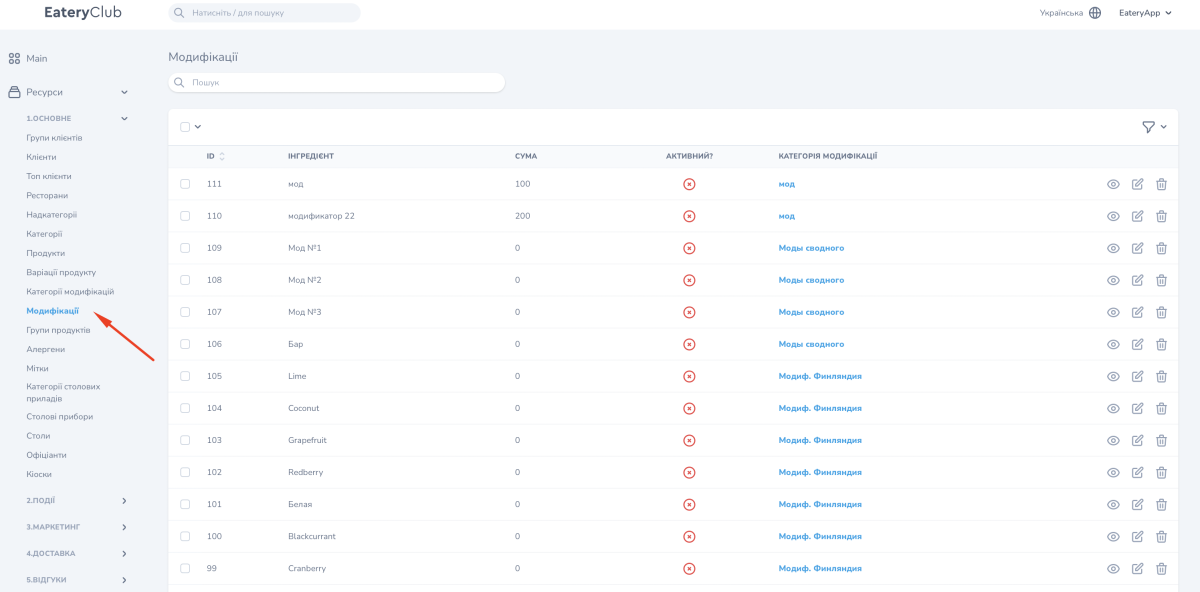
«Ресурси» (resources), the «1.ОСНОВНЕ» (main) group, the «Модифікації» item: the list of modifications that arrived from the POS system. The list has five columns: «ID», «ІНГРЕДІЄНТ» (ingredient), «СУМА» (amount), «АКТИВНИЙ?» (active) and «КАТЕГОРІЯ МОДИФІКАЦІЇ» (modification category).
The procedure for product cards is described in the guide to products in the admin panel.