Cutlery items: setting up checkout options
How to create a cutlery item, a sauce, or a survey for the Eatery Club checkout page, which fields to fill in, and when a guest sees the option.
Updated: 07.10.2026Cutlery items are extra options on the checkout page: cutlery, sauces, toppings, and short surveys. A guest selects them in the «додатково» block of the «Оформлення замовлення» window.
Cutlery items are neither products nor menu items. Therefore they:
- do not affect the order total;
- are not passed to the point-of-sale (POS) system as separate line items;
- appear in the order comment at the POS.
Examples
- «Виделка та ніж» or «Палички»: a choice of cutlery;
- «Соєвий соус», «Імбир», «Васабі»: toppings for sushi;
- «Кіт», «Собака»: a short survey about pets.
Fields
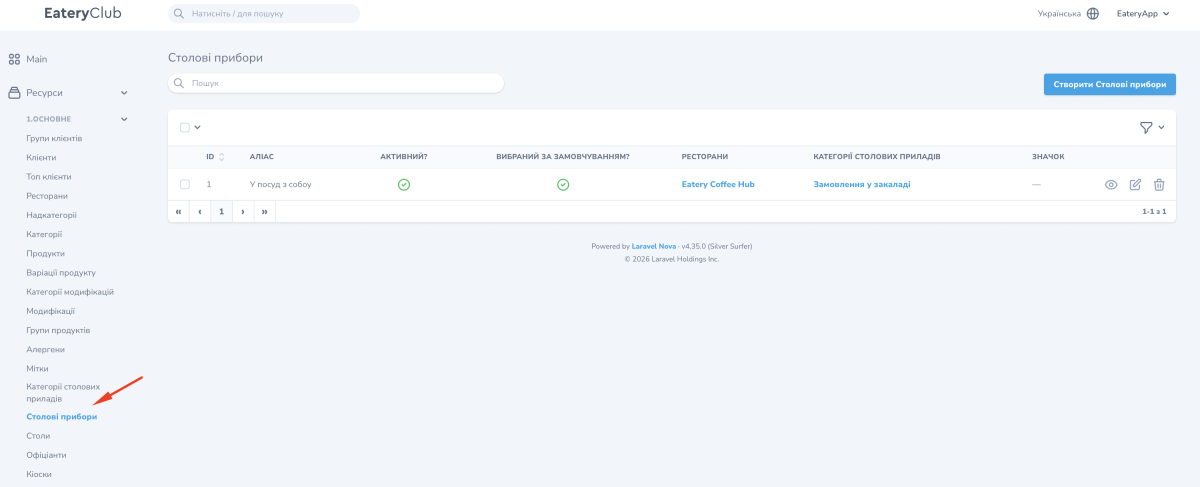
- «Аліас». The internal name of the item in the admin panel.
- «Активний?». Controls whether the item is shown to a guest.
- «Макс. кіл-ть у замовленні». How many units a guest can select in one order.
- «Вибраний за замовчуванням?». When it is on, the item is already selected when a guest opens the checkout page.
- «Ресторани». The restaurants where the item is available.
- «Категорії столових приладів». The categories the item belongs to. The form itself does not require this field, but without a category a guest will not see the item, so fill it in right away.
- «Значок». The icon of the item, picked from a list. The form does require this one.
The form marks «Аліас», «Активний?», «Макс. кіл-ть у замовленні», «Вибраний за замовчуванням?» and «Значок» with an asterisk. «Активний?» and «Вибраний за замовчуванням?» are switches. Set them separately: the first controls visibility, and the second controls preselection. An asterisk does not require you to turn both on.
Guests see the translations, so fill them in for every language.
How to create a cutlery item
- Open «Ресурси» (resources), the «1.ОСНОВНЕ» (main) group, the «Столові прибори» item, and click «Створити Столові прибори».
- Enter the «Аліас» and activate the item.
- Select a category, for example «Прибори», an icon from the list, and set the maximum quantity per order.
- Link the item to the restaurants you need.
- Save the item.
- Fill in the «Переклади» block: the name for every language.
When a guest sees the item
The item is shown on the checkout page when all three conditions are met at the same time:
- the item is active;
- the item is linked to a category;
- the item is linked to the restaurant where the guest is placing the order.
The category must be active as well: when it is inactive, every item in it is hidden. How categories are created is described in the article about cutlery categories.
Where to find it in the admin panel
«Ресурси» (resources), the «1.ОСНОВНЕ» (main) group, the «Столові прибори» item: the list of items, their categories, and their status. The settings of the checkout page itself are described in the checkout page guide.