
Checkout page settings
The checkout page editor in the Eatery Club admin panel: the components you can add, how to check the look of the page and how to save the changes.
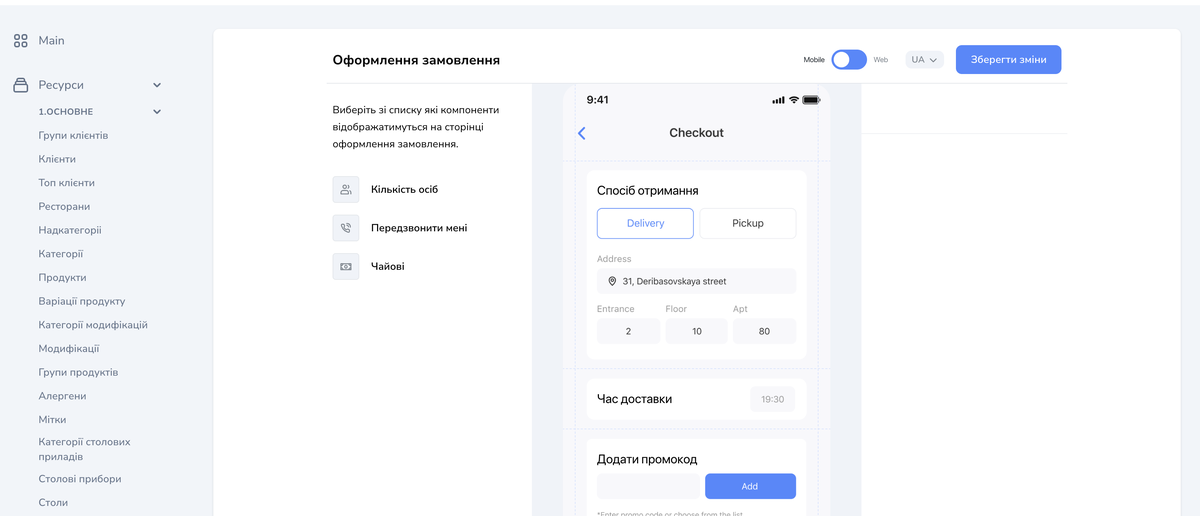
Updated: 07.10.2026The content of the checkout page is set in the «Налаштування» (settings) section, record «Налаштування кастомізованих сторінок» (settings of the customizable pages), row «Налаштування сторінки оформлення замовлення» (checkout page settings). It opens a built-in editor headed «Оформлення замовлення»: the list of components on the left, the page preview on the right.
The labels quoted here follow the historical Ukrainian screenshots in this article; your admin panel may show different labels.
The components you can add
- «Кількість осіб»: the number of people in the order.
- «Передзвонити мені»: a button with the option not to call the guest back.
- «Чайові»: a block where the guest can leave a tip.
The set of available components depends on your project’s configuration.
The preview
The preview helps you check the content and the look of the page. It shows the «Спосіб отримання» (fulfillment method, delivery or pickup), «Час доставки» (delivery time), «Додати промокод» (add a promo code), «Прилади у комплекті» (cutlery included), «Спосіб оплати» (payment method) and «Коментар до замовлення» (order comment) blocks, and below them the order summary and the confirmation button.
Do not use the amounts in the preview as an example of how an order total is calculated. Some of its captions are in English: that is how the panel shows them.
How to set the content of the page
- Open «Ресурси» (resources), the «6.Налаштування» (settings) group and the «Налаштування» (settings) item, then find in the list the «Налаштування кастомізованих сторінок» record.
- Pick the «Налаштування сторінки оформлення замовлення» row.
- Pick from the list the components to show on the page.
- Use the «Mobile» and «Web» toggle to check both versions.
- Click «Зберегти зміни» (save the changes).
After saving, open the checkout page in each channel your project uses and compare it with the preview of the matching version, «Mobile» or «Web».
