
Couriers: the restaurant’s own delivery staff
The couriers section in the Eatery Club admin panel: courier fields, how to add a courier and how to assign one to an order from the order card.
Updated: 07.09.2026The «Кур’єри» (couriers) section holds the list of the restaurant’s own couriers. It is the alternative to an external delivery service: the restaurant either hands delivery to a service or delivers itself. Open the section from the «6.Налаштування» (settings) group of the side menu, item «Кур’єри».
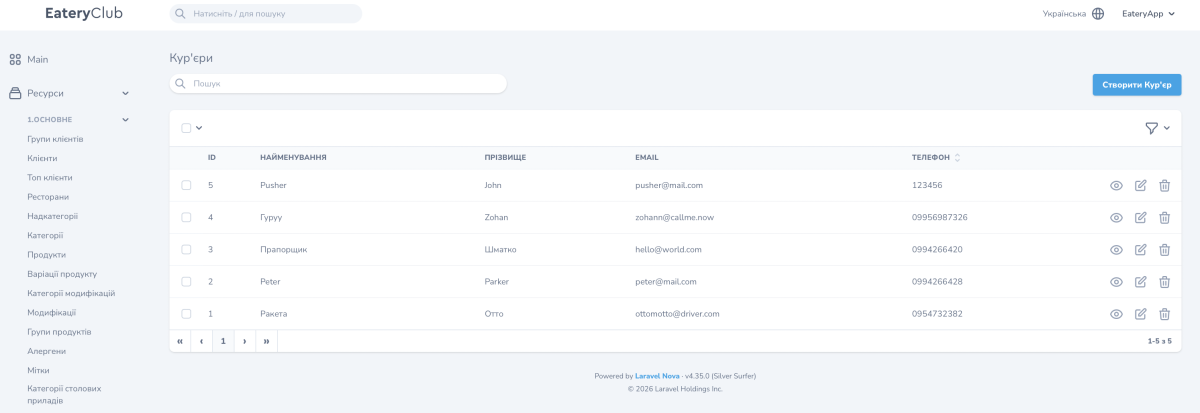
The list shows the «ID», «НАЙМЕНУВАННЯ» (name), «ПРІЗВИЩЕ» (surname), «EMAIL» and «ТЕЛЕФОН» (phone) columns. A new courier is created with the «Створити Кур’єр» (create courier) button.
Courier fields
- «ID»: assigned automatically.
- «НАЙМЕНУВАННЯ»: the courier’s first name.
- «ПРІЗВИЩЕ»: the courier’s surname.
- «EMAIL»: the work email address.
- «ТЕЛЕФОН»: the work phone number.
How to add a courier
- Open «Кур’єри» in the «6.Налаштування» group of the side menu.
- Click «Створити Кур’єр».
- Fill in «НАЙМЕНУВАННЯ», «ПРІЗВИЩЕ», «EMAIL» and «ТЕЛЕФОН».
- Save.
How to assign a courier to an order
- Open the card of the order in the «Замовлення» (orders) section.
- In the «⋯» actions menu choose «Призначити кур’єра» (assign the courier).
- Pick the courier from the «Кур’єр» field.
- Click «Виконати дію» (perform the action).
After that the courier is assigned to that order.
