Data export: downloading export files
Where to find the export log in the Eatery Club admin panel, what the table columns mean, and how to download a finished export file.
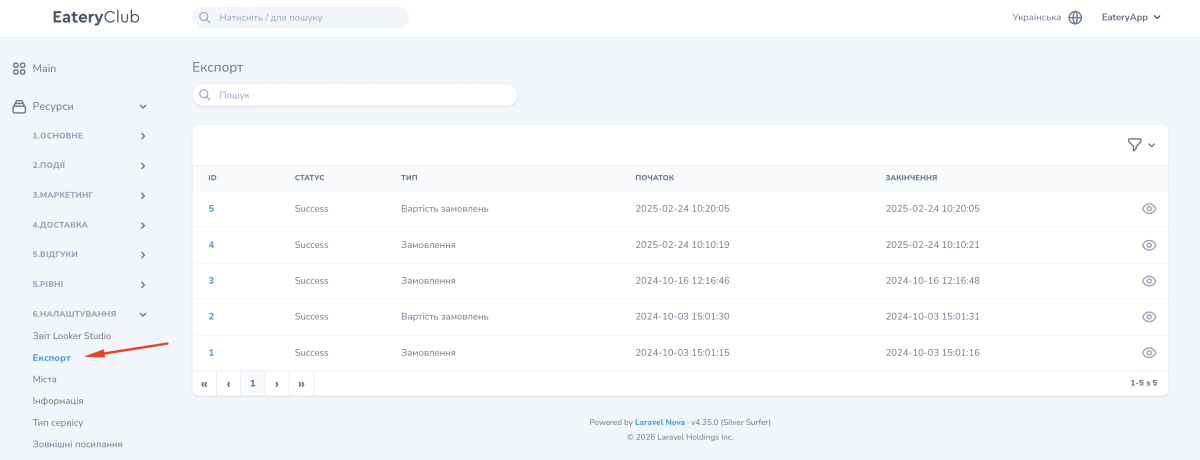
Updated: 18.09.2026The «Експорт» (Export) section in the «Налаштування» (Settings) group shows the log of data exports that have already run. Here you find a finished file and download it. New exports are not created in this section: they are started from other sections of the admin panel, for example from «Замовлення» (Orders).
If the export you need is not in the list, go back to the section that holds that data and start the export there. Orders, for example, are exported from Orders: the list, statuses and actions.
The export table
The list has the following columns:
- «ID»: the export number.
- «Статус» (Status): the file can be downloaded once this column shows «Success».
- «Тип» (Type): which data was exported, for example «Замовлення» (Orders) or «Вартість замовлень» (Order value).
- «Початок» (Start) and «Закінчення» (End): the date and time when the export started and finished.
How to download an export file
- Open the «Налаштування» section, then «Експорт».
- Find the export you need in the list by date or type.
- Open it with the view button, the eye icon.
- Click «Завантажити» (Download) next to the file name.