External links: phone, URL, email
Project-level links: the URL, Phone and Email types, the value format, activation and the guest-facing label in the translations.
Updated: 07.10.2026The «Зовнішні посилання» (external links) section holds a project-level list of links: contacts, general social media pages and extra resources. Each record has a type, a value and its own label for every language enabled in the project.
Social media for a single restaurant
TikTok, Instagram and Facebook links for a specific restaurant are filled in on that restaurant’s own card. The «Зовнішні посилання» section works at project level, so it does not hold the social media of an individual venue.
Link types
- «URL»: a page address in the form https://example.com;
- «Phone»: a phone number including the country code;
- «Email»: an email address in the form example@example.com.
- All four fields of the form are required: «Назва для посилання», «Тип», «Значення» and «Активний?». «Активний?» is a choice from a list, «Так» (yes) or «Ні» (no).
How to add a project-level support phone number
- Open the «Зовнішні посилання» section and click «Створити Зовнішнє посилання» (create external link).
- In «Назва для посилання», enter a name for the admin panel, for example «Support». The guest does not see this name.
- In «Тип», choose «Phone».
- In «Значення», enter the number including the country code.
- Set «Активний?» (active?) to «Так» (yes).
- Save the record.
- Fill in «Переклади» (translations): that is where you set the label the guest sees, for example «Підтримка» (support).
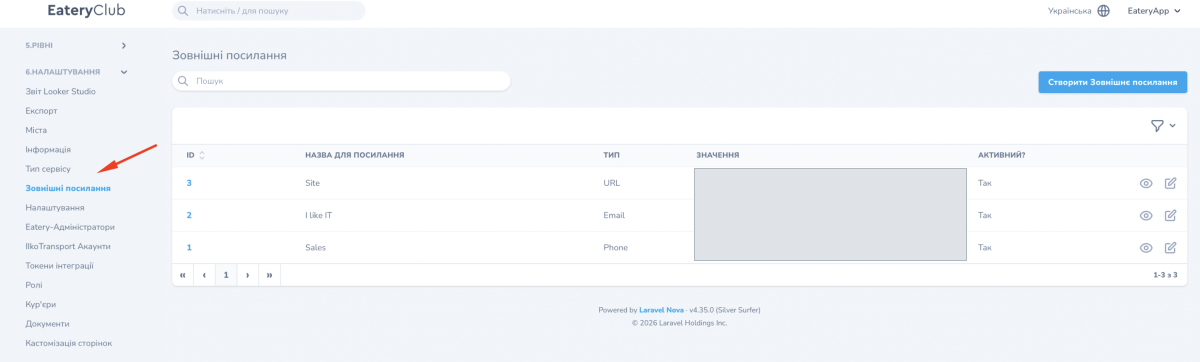
Where to find it in the admin panel
The section is called «Зовнішні посилання». You open it from the «6.Налаштування» (settings) group of the side menu. In the list each record shows the columns «Назва для посилання», «Тип», «Значення» and «Активний?».