
Review icons: the images in the review form
Which four review icons the Eatery Club panel lets you configure, how to replace an image, and where to check the result in the app.
Updated: 07.10.2026Summary
Get a brief overview of the main steps and tips from this article in one click
The Review Icons settings group («Іконки відгуків») holds the images used in the review flow: the rating, the thank-you after submitting, and the delivery rating. Rating levels are not configured in this group.
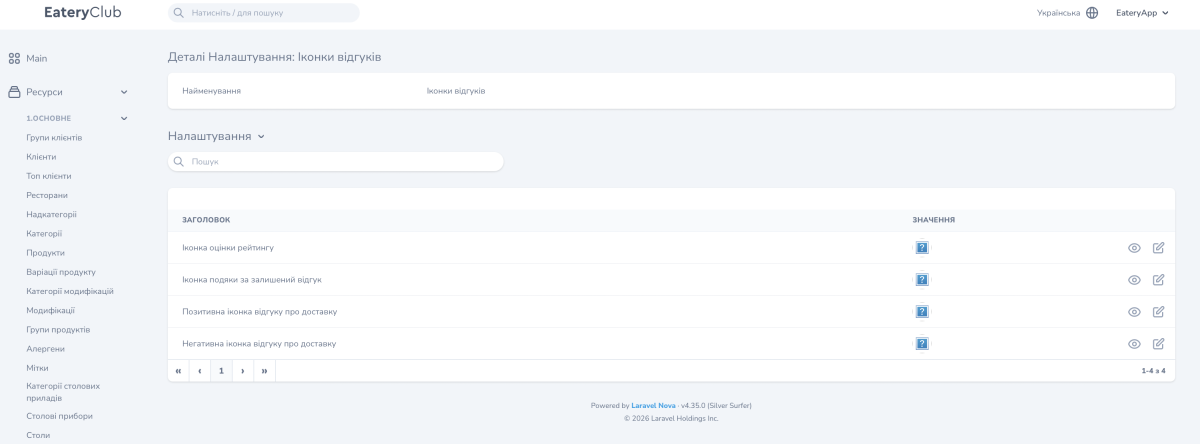
Open Settings («Налаштування») and find the Review Icons group. In the screenshot, the page is called Setting Details: Review Icons («Деталі Налаштування: Іконки відгуків»). At the top is the Name field («Найменування») with the value Review Icons; below it is the Settings list («Налаштування») with the Title («Заголовок») and Value («Значення») columns.
The icons in the group
The group holds four records:
- Rating icon («Іконка оцінки рейтингу»): the icon used for the rating in the review form.
- Review thank-you icon («Іконка подяки за залишений відгук»): the icon a guest sees after submitting a review.
- Positive delivery review icon («Позитивна іконка відгуку про доставку»): the icon for a positive delivery rating.
- Negative delivery review icon («Негативна іконка відгуку про доставку»): the icon for a negative delivery rating.
The Value column shows the current image of each record.
Replace an icon
- Open the row you need with the edit button (pencil icon).
- Upload the prepared image in place of the current one.
- Save the change.
- Check the result in the app where the changed record appears: the review form, the thank-you screen after submitting, or the delivery rating.
Keep the icons in one style so the review flow looks consistent.
