
Other app settings
The «Інші налаштування» record in the Eatery Club admin panel: which parameters it holds, how to open the one you need and how to save the change.
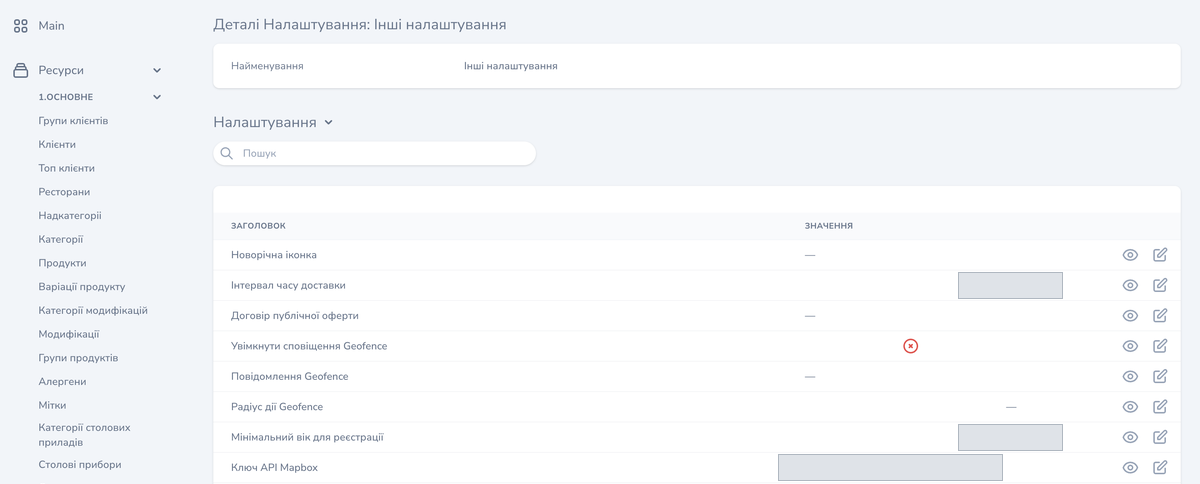
Updated: 07.10.2026The «Налаштування» (settings) section, record «Інші налаштування» (other settings), collects the project’s extended parameters: seasonal, visual, regional ones, and the access keys to external services. The «Налаштування» block shows them in a table with the «ЗАГОЛОВОК» (heading) and «ЗНАЧЕННЯ» (value) columns, and every row is edited separately.
The labels quoted here follow the historical Ukrainian screenshots in this article; your admin panel may show different labels.
The parameters of the record
Seasonal and visual
- «Новорічна іконка»: the app’s New Year icon.
- «Фонове відео в застосунку»: the background video in the app.
- «Плейлисти»: the playlists in the app.
- «Зображення для Wallet»: the loyalty card image for Wallet.
- «Google Wallet Class ID»: the Class ID for Google Wallet.
Guest and registration
- «Мінімальний вік для реєстрації»: the minimum age for a guest to register.
- «Вікове попередження (18+)»: the 18+ age warning.
- «Договір публічної оферти»: the public offer agreement file.
Menu, prices and sorting
- «Приховати в меню продукти зі стоп-листу»: hiding stop-listed products in the menu.
- «Відображення валюти»: showing the currency.
- «Порядок сортування модифікаторів»: the sort order of modifiers.
- «Вартість пакування»: the packaging cost.
- «Сортування за алфавітним порядком»: alphabetical sorting.
Delivery and pickup
- «Інтервал часу доставки»: the delivery time interval.
- «Слоти доставки та самовивозу (тип, час, крок)»: the delivery and pickup slots: type, time, step.
- «Ім’я відправника для Uklon»: the sender name for Uklon.
Geofence
- «Увімкнути сповіщення Geofence»: turning Geofence notifications on.
- «Повідомлення Geofence»: the text of the Geofence notification.
- «Радіус дії Geofence»: the Geofence radius.
Regional parameters and ERP
- «Регіональне налаштування»: the regional setting.
- «Імпортувати одиниці виміру продуктів з ERP»: importing product units of measurement from the ERP.
Keys and external services
- «Ключ API Mapbox»: the Mapbox access key.
- «API ключ для Google Business Profile»: the Google Business Profile access key.
- «Ключ CAPTCHA»: the CAPTCHA key.
- «Telegram чат id для форми зворотного зв’язку»: the Telegram chat id for the feedback form.
IP address blocking
- «Блокування підозрілих IP-адрес»: blocking suspicious IP addresses.
The set of parameters depends on your project’s configuration.
How to change a parameter
- Open «Ресурси» (resources), the «6.Налаштування» (settings) group and the «Налаштування» (settings) item, then find in the list the «Інші налаштування» record.
- Find the row you need.
- Use the edit control in that row: the «Оновлення Налаштування» form for that row opens, with the «Значення» (value) field.
- Fill in «Значення». Parameters that hold an image have an «Add New Media» button in the form, and toggles have a checkbox.
- Click «Оновити Налаштування» (update the setting).
The «Оновити та продовжити редагування» button saves the change and keeps the form open. The «Скасування» button closes the form without saving.
