
Eatery Administrators: Admin Panel Users
How to create an Eatery Club admin panel user, what the list columns show, and how to change the role of an existing user.
Updated: 04.09.2026The “Eatery-Адміністратори” section holds the list of people who sign in to the admin panel. Here you create new users and change their roles. The section is available to the account Owner only.
The list shows “ID”, “Ім’я” (first name), “Прізвище” (last name), “Телефон” (phone), “Email” and “Role” for every user. The e-mail address is used as the username for signing in to the panel.
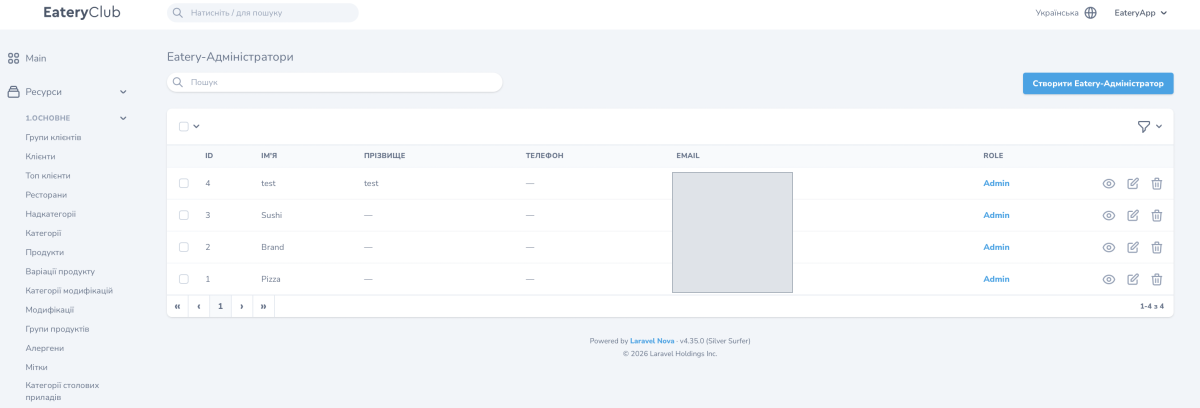
How to create a new user
- Open the “6.НАЛАШТУВАННЯ” section, the “Eatery-Адміністратори” subsection, and click “Створити Eatery-Адміністратор”.
- Fill in the first and last name.
- Enter the e-mail address: the user will sign in to the panel with it.
- Set a password.
- In the “Роль” field, the role, choose one of the roles created in the account.
- Save the user.
Which roles are available depends on the roles created in the account. Creating them is covered in Roles and permissions.
How to change a user’s role
- Open the user for editing.
- In the “Роль” field, choose a different role.
- Save the user.
To close panel access for an employee who no longer works with you, contact Eatery Club support: this article does not describe the access revocation procedure.
