How to Turn Guest Wi‑Fi into Venue Revenue
A broken guest Wi‑Fi connection can block an order. Eatery Captive Portal opens menus and offers after connection, with Eatery statistics showing how guests respond.

Loading audio…
—:—
I recently stopped for lunch at a small restaurant in the old city center. Inside, there were thick stone walls, and my phone showed barely one bar of mobile signal. The waiter suggested scanning the menu on my phone: “It’s faster. You can view the menu and pay online.”
Relieved, I found the guest Wi‑Fi and entered the password. The login page appeared, instantly vanished, and came back with a 404 error. After three failed attempts, I was nervously watching the clock. Instead of a pleasant aperitif, I felt pure frustration: I couldn’t even open the menu, let alone place an order.
If the Wi‑Fi doesn’t work properly, the restaurant risks losing a sale before the guest even takes their first sip of water.
How Eatery Captive Portal works
Once a guest connects to the network, Eatery Captive Portal displays a page with the menu, seasonal deals, and an “Order Now” button. Authentication runs in the background. Eatery says it meets modern security standards and that the portal protects the network.
Guests don’t need to enter a password or choose among similar network names such as “wifi‑guest‑5g‑new”.
The first thing guests notice is speed: password-free access and one tap take them to the menu. They then choose dishes, such as a pizza, and add them to the cart without spending time on technical hassles.
The landing page can carry a banner for a new set or a recently launched business lunch. Guests see the offer before switching to social media and often add something to their order on impulse.
You can update menus and promotions in the Eatery admin panel. An idea for either can be on screen in minutes.
What to look for in the data
If guests notice offers on a banner and add a second drink or dessert, average order value may rise. If ordering is convenient, guests may return more often.
Eatery statistics show average order value, banner opens, and menu visits that lead to paid orders in near real time. You can also compare days with different promotions to assess guests’ response to offers.
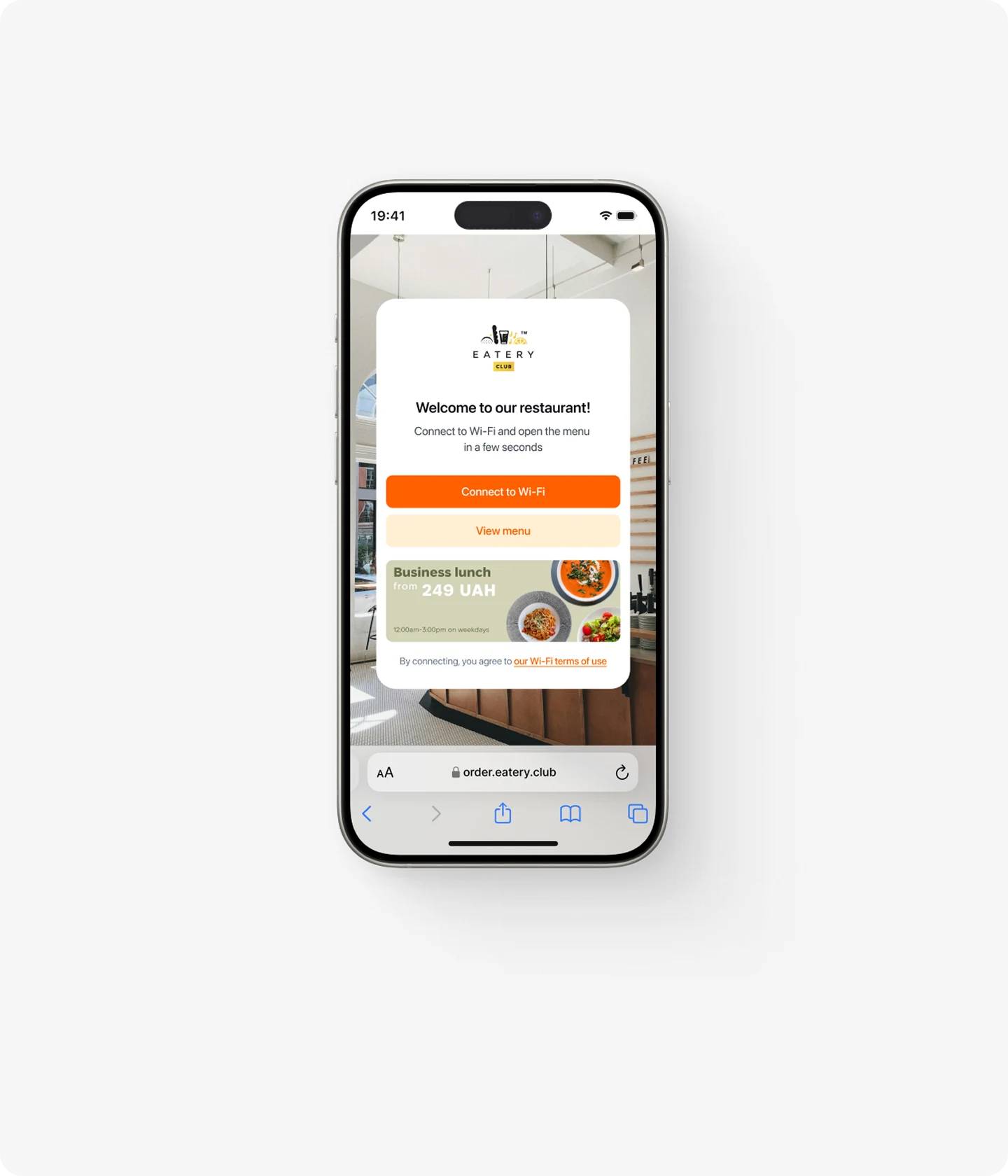
If the restaurant had had Captive Portal that day, I would have joined the Wi‑Fi without a password, opened the menu immediately, and sent my order to the kitchen in two minutes, without wasting my time or the restaurant’s on a connection failure.
I might have added a salad had I seen its photo. The 404 error blocked access to the menu, and the restaurant never learned of the possible addition to my order.
To try Eatery Captive Portal at your venue, request a demo.
Published in